
Viewing Your Career Pass
Open the Achievements page from your dashboard sidebar, then select the Career Pass tab. The page opens at /achievements and the Career Pass tab sits at /achievements?tab=career-pass.
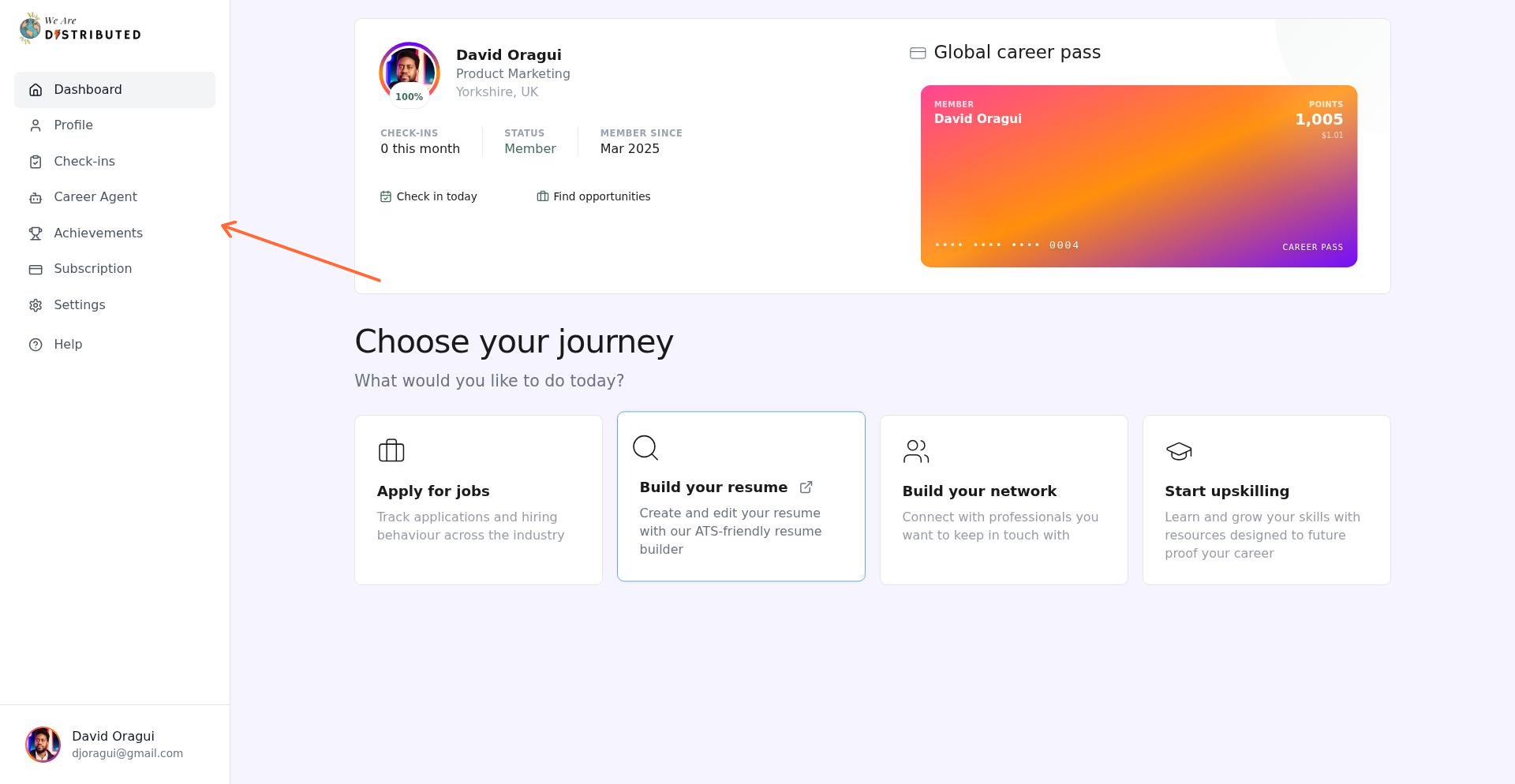
Your Career Pass card also appears at the top of your home dashboard. Click it to go straight to the Career Pass tab.
How to Earn Points
Points are awarded automatically when you complete activities across four categories: Profile, Check-ins, Subscription, and Career Agent. Workflow achievements appear under Career Agent. You also earn points for your job search in the Job Tracker.
Profile
- Choose your job families: the first time you save your job families (50 pts)
- Picture Perfect: Add a profile photo (50 pts)
- Tell Your Story: Write a bio on your profile (25 pts)
- Full Picture: Complete your profile with name, bio, title, location, photo, and skills (100 pts)
- Career stories: 100 points for each of your first 8 complete stories on the Stories tab of your profile. The points land about three days later. See Edit your profile.
Check-ins
- Each new Job Search or Employment check-in earns 25 base points.
- First Steps: Complete your first career check-in (50 pts)
- On a Roll: Complete 5 career check-ins (100 pts)
- Committed: Complete 25 career check-ins (250 pts)
- Career Veteran: Complete 50 career check-ins (500 pts)
Your first check-in earns 75 points in total: 25 base points plus the 50-point First Steps achievement. Check-in milestones count both Job Search and Employment check-ins together.
Job Tracker
- 20 points the first time a tracked job reaches Applied or a later stage. The job needs to come from our job board or have a job link, and each job earns this once.
- 10 points each time an application moves forward to a new stage, such as Screening or Interviewing. On the Board view, the points float up from the card.
- 500 points for a tip on a company's board. The tip needs at least 20 words, can't repeat another note on that board, and you need to have applied to the company at least a day before. Applications marked Closed count. You earn this once per company. Your note shows the points as pending and when they land, usually 24 hours later.
- 25 points the first time you track a job.
- 25 points the first time you follow a company in Groups.
Career Agent
- Career Agent conversations don't earn points on their own; the achievements below do.
- Hello, Agent: Send your first message (50 pts)
- Regular Learner: Have 10 conversations (150 pts)
- Power User: Have 50 conversations (300 pts)
Workflows (listed under Career Agent)
- Automated: Set up your first career workflow (100 pts)
- System Builder: Set up 3 career workflows (200 pts)
Subscription
- Career Investor: Upgrade to a paid subscription (500 pts)
- Invested: Maintain a paid subscription for 3 months (300 pts)
- Dedicated: Maintain a paid subscription for 6 months (500 pts)
- Career Champion: Maintain a paid subscription for 12 months (1,000 pts)
Related: Job Search Check-ins | Employment Check-ins | Using Career Agent
Tracking Achievements
The Achievements tab shows all available achievements, grouped into Bronze, Silver, Gold and Platinum shelves. Each shelf shows how many of its achievements you've unlocked. Use the filter pills to browse by category or view all at once.
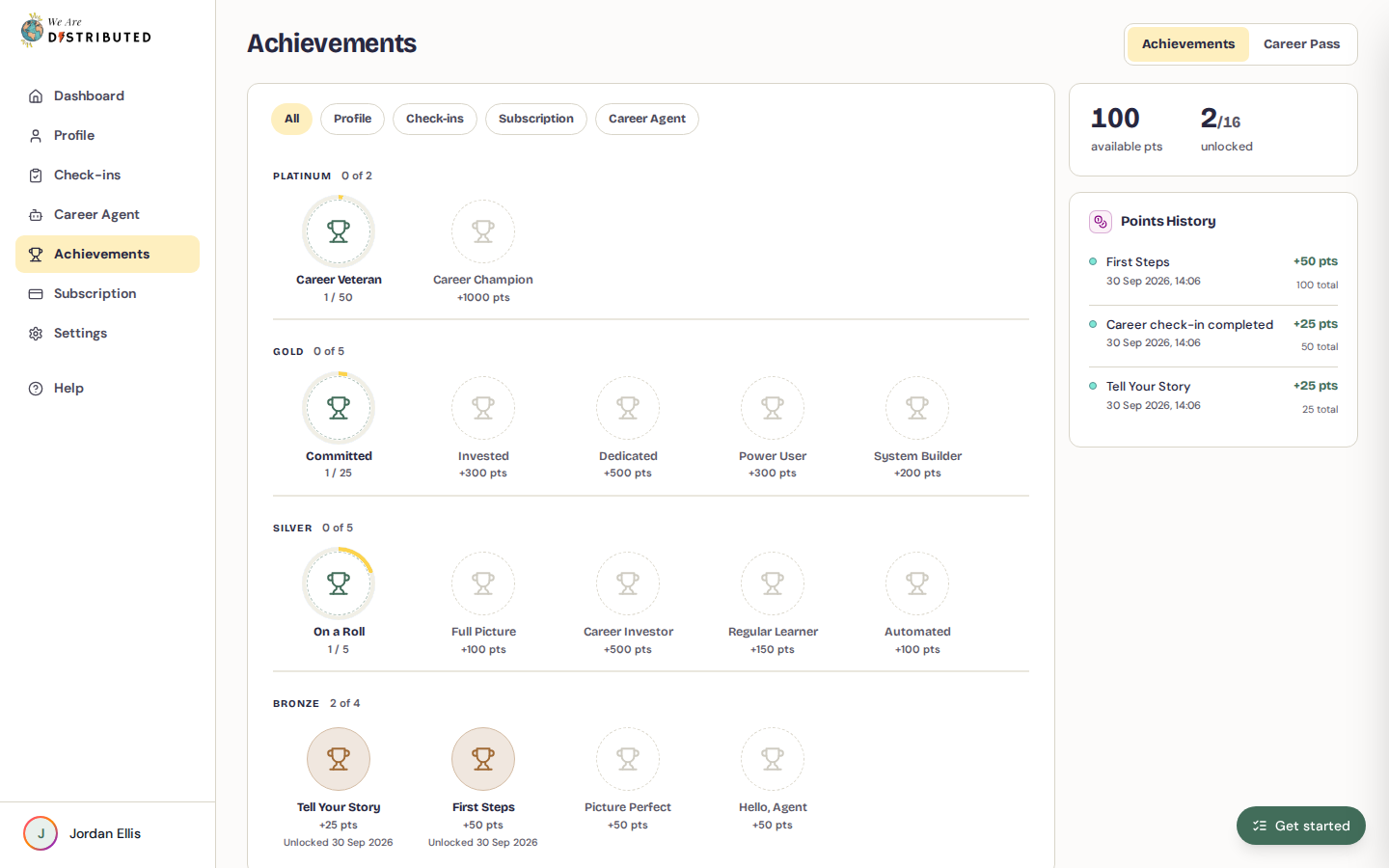
The filters are All, Profile, Check-ins, Subscription, and Career Agent. There is no separate Workflows filter; workflow achievements appear under Career Agent.
Each achievement shows:
- Its title and points value (e.g., "+50 pts")
- A progress indicator for multi-step achievements you've started (e.g., "3 / 5")
- The date you unlocked it, once unlocked
Hover over an achievement to see its description.
Points History sits below the achievements. It lists every point-earning activity with its date, description, points earned and running balance.
Understanding Your Points Balance
Your points and achievements show on every plan, including Free.
On the Achievements tab, Banked on your pass shows:
- your points balance and what it's worth in dollars (1,000 points = $1.00);
- a meter towards 15,000 = 1 month of Lite;
- Your monthly standing, for example "Top 10% this month", once you've earned points this month;
- Tier progress, for example "Bronze · 400 points to Silver".
The Career Pass tab shows your card along with your Points on your pass, your Lifetime points and your Tier.
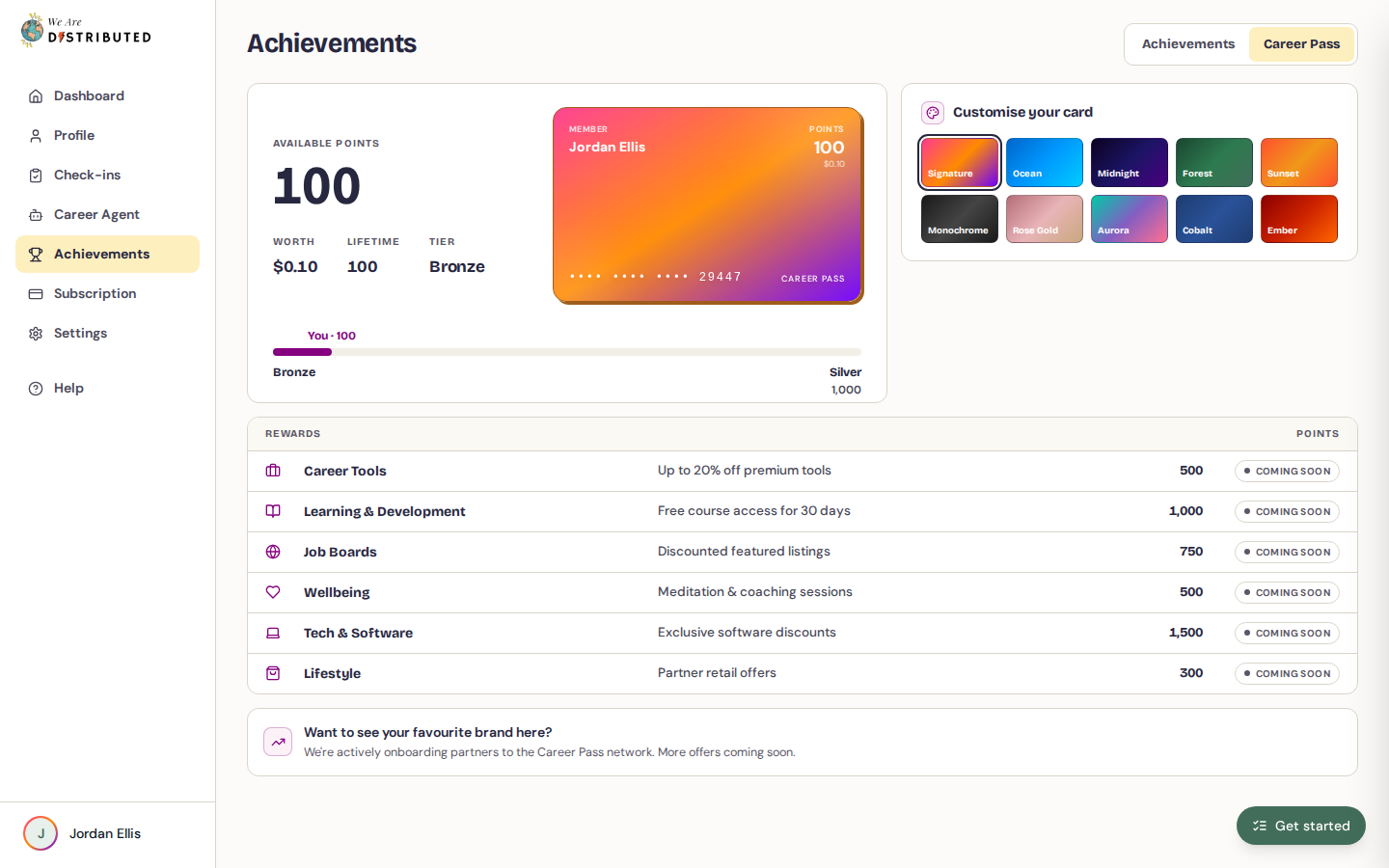
Your tier level is set by your lifetime points, not your current spendable balance:
- Bronze: 0–999 points
- Silver: 1,000–4,999 points
- Gold: 5,000–19,999 points
- Platinum: 20,000 points or more
Spend your points on membership
You can spend your points on a month of We Are Distributed membership. Rewards are listed on the Career Pass tab under Rewards:
- A month of Lite: 15,000 points
- A month of Plus: 30,000 points
To claim one:
- Open Achievements, then the Career Pass tab. If you have 15,000 points or more, you can also click Claim a free month on the Achievements tab.
- Under Rewards, choose the reward. Each one shows whether it's Available now or how many more points you need.
- Click Use and the number of points.
What happens next depends on your plan:
- No paid plan: your first month is covered, then it's the normal price. We ask for a card to start the membership and only charge it from the second month. Your points are held while checkout is open; if you leave checkout, you can recover the link or release your points.
- Paid monthly plan: the points come off your next bill as a credit. Your plan and renewal date stay the same. The reward must match your current plan; otherwise it shows Not your current plan.
- Annual or lifetime plan: these plans aren't eligible for a monthly bill credit.
If no reward matches your plan today, for example on Extra or Premium, or on an annual or lifetime plan, Banked on your pass says No matching reward for your plan today and your points stay banked.
Only points that have landed can be spent; points still pending, such as a new tip's, aren't counted yet. After you claim a reward with points from your activity, your next reward from activity points unlocks three months later. Until then, rewards show Activity points cooling down and the date it unlocks.
Customizing Your Card
Personalize your Career Pass card with different color themes. On the Career Pass tab, find the Customise your card panel.
Choose from 10 gradient themes (Signature, Ocean, Midnight, Forest, Sunset, Monochrome, Rose Gold, Aurora, Cobalt, Ember). Click a swatch to select it, then click Save theme.