
Upload your resume to your profile
Your resumes live on your profile, which the dashboard and the Job Tracker share.
- In the Job Tracker, open the account menu at the bottom of the sidebar and click View Profile. Your profile opens in the dashboard.
- Open the Work experience tab. Your resumes are at the top, under Resumes.
- Click Upload a resume, or drop a file onto the box below your resumes. You can upload a PDF or Word (.docx) file of up to 5 MB.
- If you have more than one resume, click Make primary on the one you want to use by default. Your Primary resume is the one the Resume Analyzer reads.
On Lite, the tab shows how many of your 2 resumes you've used. Click Analyze in Job Tracker next to your primary resume, or Back to Job Tracker at the top of the page, to return. For more on your profile, see Edit your profile.
Run a resume analysis
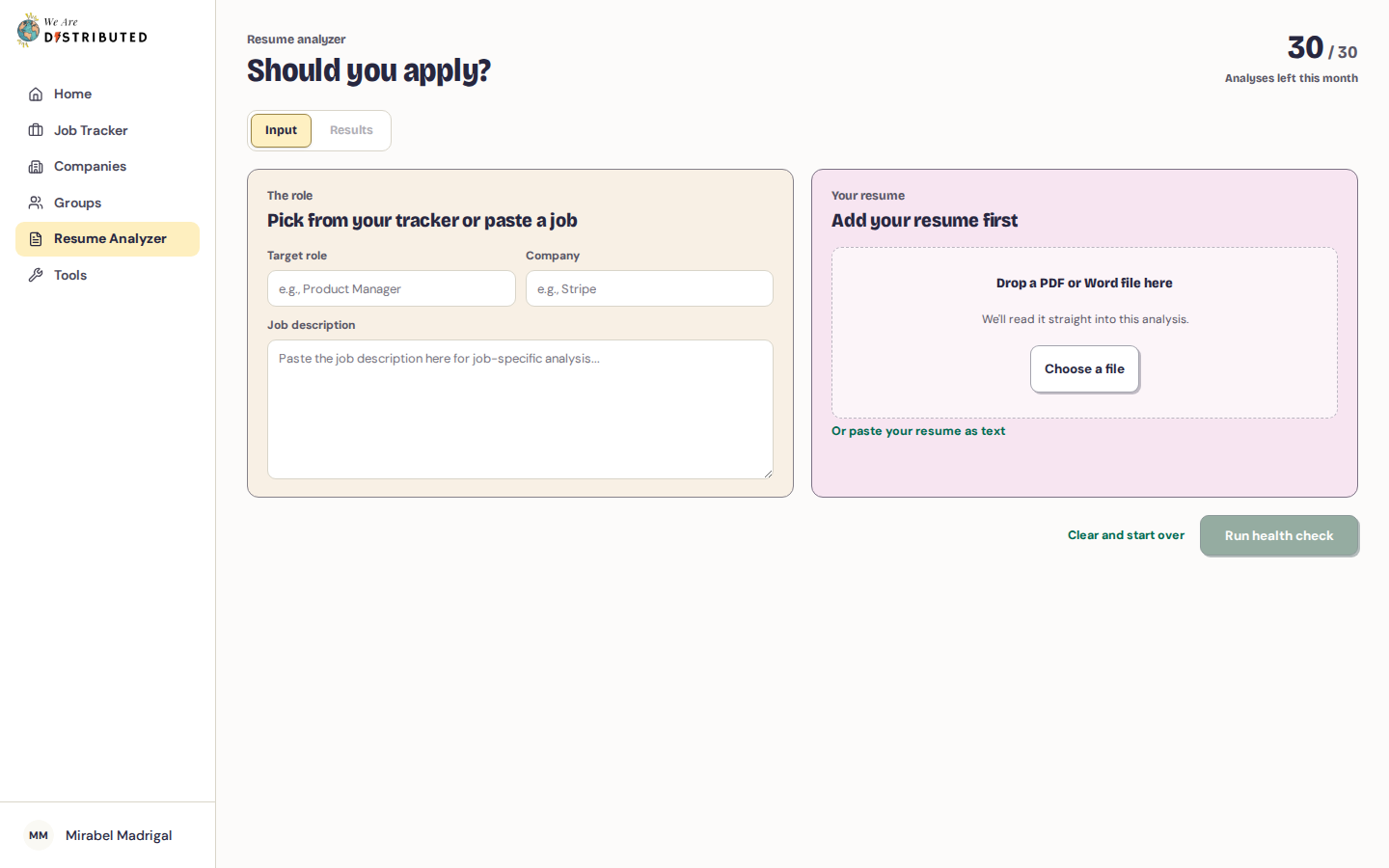
- Click Resume Analyzer in the Job Tracker sidebar. The page asks Should you apply? and shows how many analyses you have left this month.
- Under The role, pick one of your pending applications from the tracker, or click Paste a job description instead and enter the target role, company and job description. If the application you pick has no saved job description, the analyzer looks it up for you. If it can't find one, it asks you to paste it.
- Under Your resume, your primary resume is selected. Choose another saved resume if you want, or click Manage resumes on Profile to add one on your profile. If you haven't saved a resume yet, you can drop in a PDF or Word file, or paste your resume as text, for this analysis only. Once the file is read, you'll see how many words were read, with Replace and Remove links. If the text can't be read, try a PDF saved from Word or Google Docs, or paste the text.
- Click Analyze against the company (or Analyze this job if you didn't enter a company).
No job in mind? Click Run it next to No job in mind? Run a resume check to check your resume on its own.
Each analysis or resume check uses one of your analyses for the month, including its Success odds and, on Plus and above, its strategy. If an analysis fails, it doesn't count. Success odds is worked out from the resume you chose for this analysis.
Read your results
Your results open on the Results tab:
- The verdict tells you whether to apply now or strengthen your resume first, with scores for Match, ATS (how easily an applicant tracking system can read your resume) and Success odds.
- Missing from your resume lists keywords from the job that your resume doesn't show.
- Where you stand shows how many of the company's requirements you meet. On Plus and above, it also compares you with people who got interviews.
- Fix these first lists the most important changes to make, and Why they might say no points out the risks in your application.
- Your strategy (Plus and above) gives a plan for this role and suggests roles worth exploring.
A resume check shows your ATS score, What's working and Fix these first.
Click Save analysis to keep your results. Saved analyses appear under Recent on the Input tab. Click Run another to start a new analysis.
The analysis helps you improve your resume, but it does not guarantee an interview.
Next steps
After updating your resume, upload the new version and run the analysis again to check whether your scores improve. If you're actively applying, keep your tracker up to date with How to track job applications.