
Comparing subscription tiers
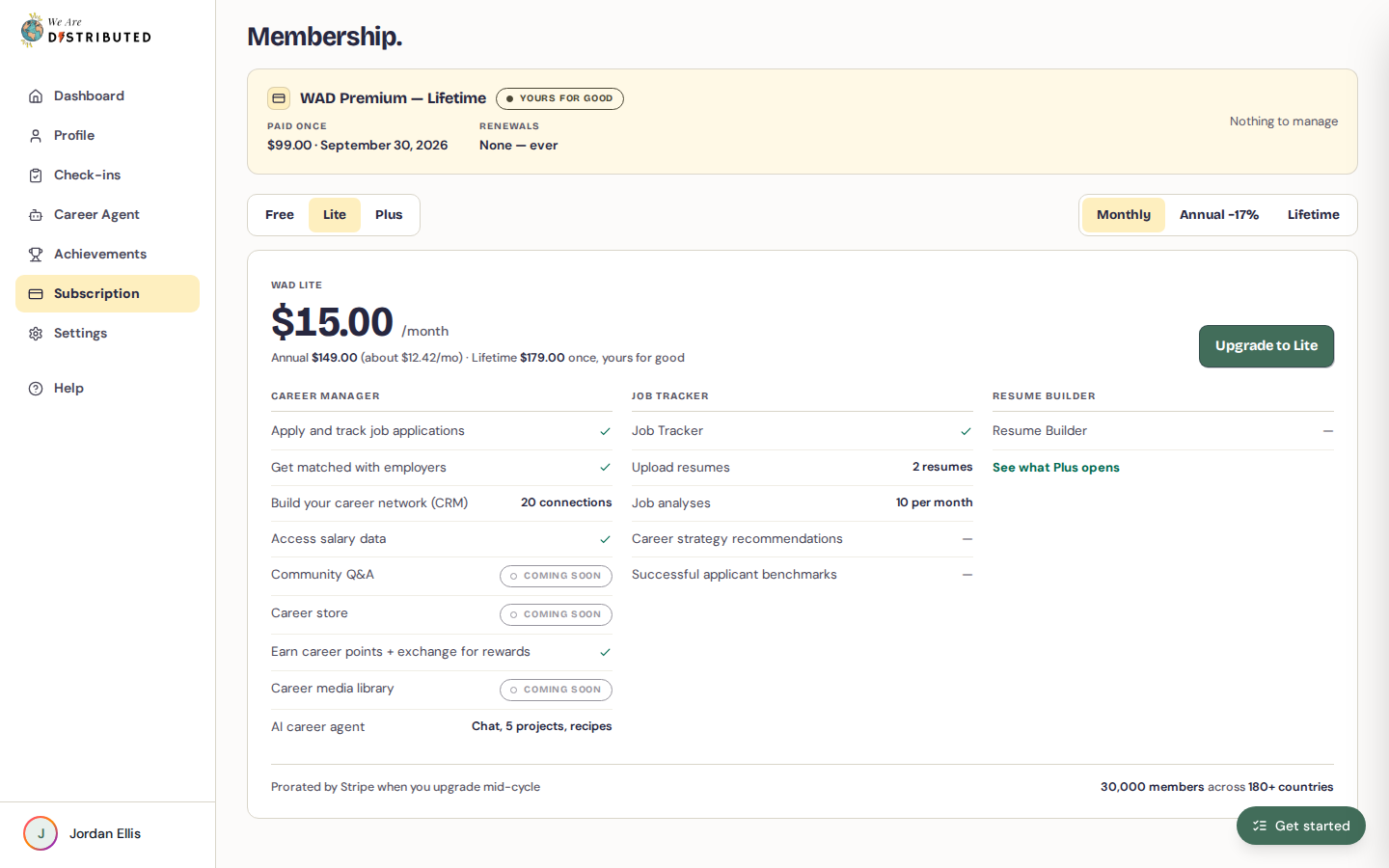
This is the comparison shown on the Membership page (open Subscription in the dashboard sidebar):
| Feature | Free | Lite | Plus |
|---|---|---|---|
| Apply and track job applications | Apply only | Yes | Yes |
| Get matched with employers | Unverified only | Yes | Yes |
| Build your career network (CRM) | 5 connections | 20 connections | 50 connections |
| Access salary data | Limited access | Yes | Yes |
| Earn career points and exchange them for rewards | Earn points; 15,000 cover your first paid month | Yes | Yes |
| AI Career Agent | No | Chat, 5 projects, recipes | Automated workflows |
| Job Tracker | No | Yes | Yes |
| Upload resumes | No | 2 resumes | Unlimited resumes |
| Job analyses | No | 10 per month | 30 per month |
| Career strategy recommendations | No | No | Yes |
| Successful applicant benchmarks | No | No | Yes |
| Resume Builder | No | No | Yes |
Community Q&A, the career store and the career media library are marked Coming soon.
Extra and Premium
Extra and Premium members get the same access as Plus in Career Agent and the Job Tracker, with more job analyses each month (see below). In job search groups, they can also follow more companies.
Resume upload and analysis limits
You keep your resumes on your profile and run job analyses in the Job Tracker:
- Lite: save up to 2 resumes and run 10 job analyses a month.
- Plus, Extra and Premium: save unlimited resumes and get career strategy recommendations and comparisons with successful applicants. Plus runs 30 job analyses a month, Extra 60 and Premium 100.
Free members can't upload resumes or run analyses. Learn more about uploading your resume and using the analyzer.
Following companies in groups
In the Job Tracker's Groups, you can follow companies to read their boards before you apply. How many you can follow depends on your plan: 3 on Free, 10 on Lite, 30 on Plus, 75 on Extra and unlimited on Premium.
Career Agent project limits
Lite members can create up to 5 Career Agent projects. Projects help organize different job searches (e.g., "Software Engineer roles" and "Product Manager roles"). Plus members have unlimited projects and can also set up automated workflows for scheduled searches and actions.
Free users see an upgrade prompt when accessing Career Agent—you'll need Lite or higher to use it. Learn more about Career Agent.
Monitoring your usage
To check your current plan and subscription status:
- Click Subscription in the dashboard sidebar.
- If you have a paid plan, the Membership page shows your plan name, its status and your billing dates.
Your subscription page updates within 1-2 minutes after making changes. If you don't see updates immediately, refresh the page.
In Career Agent, plans with a project limit show how many projects you've used out of your limit.
Upgrading to a higher tier
To upgrade your subscription:
- Click Subscription in the dashboard sidebar.
- In the plan picker, choose Lite or Plus and a billing option.
- Click Subscribe to or Upgrade to your chosen plan.
- Complete payment on Stripe's secure checkout.
Wait 1-2 minutes after payment, then refresh to confirm your upgrade. Learn more about managing your subscription.
Upgrading from Free to Lite unlocks Career Agent and the Job Tracker—the most common upgrade path for active job seekers.