
Some dashboard tools require a Lite membership. For example, Career Agent requires Lite or higher.
Start with your profile
Open Profile from the dashboard sidebar and complete the basics first: your title, location, job families, experience and skills. See Edit your profile for each tab.
A complete profile helps the platform personalize your dashboard and makes tools like Career Agent more useful.
Find your way around the dashboard
The dashboard greets you by name and puts your next steps up front:
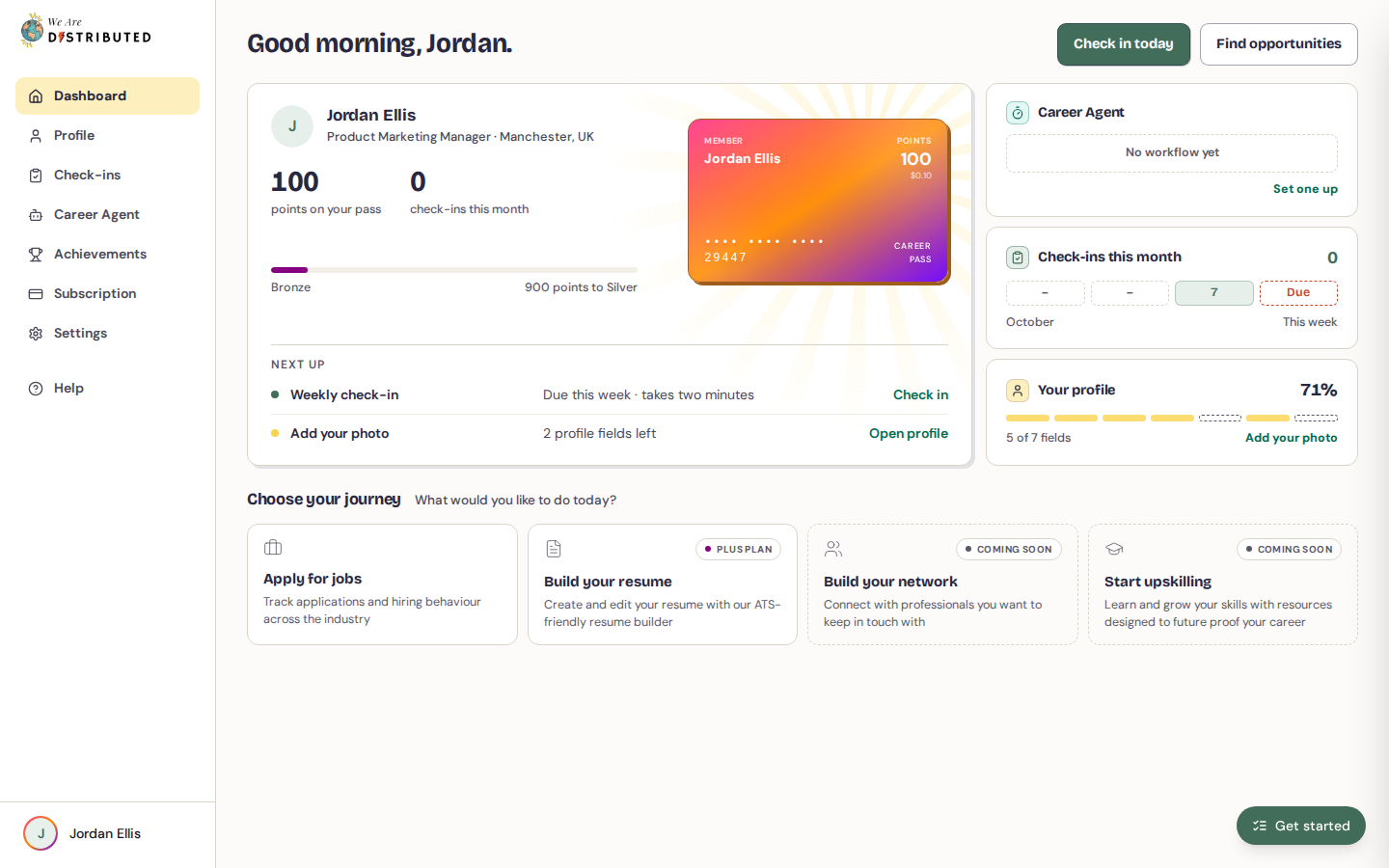
- Check in today takes you to Check-ins so you can log this week's progress.
- Find opportunities opens the job tracker in a new tab.
- Your Career Pass card shows your points and tier. Click it to open the Career Pass tab of Achievements.
- Next up lists the things worth doing now, such as your weekly check-in, new roles from your latest Career Agent run, or the next field missing from your profile.
- Side panels show your Career Agent workflow (or Set one up if you don't have one yet), your check-ins this month, and how complete your profile is. In the workflow panel, click the number of jobs or one of the bars to open that run in Career Agent.
Choose your journey
Further down, Choose your journey asks what you would like to do today and presents four journey cards. Available journeys open a separate We Are Distributed application in a new tab.
- Apply for jobs — Track applications and hiring behaviour across the industry. Opens the job tracker's Find jobs tab in a new tab.
- Build your resume — Create and edit your resume with our ATS-friendly resume builder. This card is marked Plus plan; if you're not on Plus, clicking it takes you to the Subscription page.
- Build your network — Connect with professionals you want to keep in touch with. This card is marked Coming soon and cannot be opened yet.
- Start upskilling — Learn and grow your skills with resources designed to future-proof your career. This card is marked Coming soon and cannot be opened yet.
Get to your first win
- Complete your profile. Open Profile from the dashboard sidebar, or follow the profile item under Next up.
- Click Check in today to log your first check-in.
- Click Find opportunities to open the job tracker and start applying.
For step-by-step help with tracking applications, see How to track job applications.
Use the rest of the dashboard
The dashboard sidebar keeps Career Agent, Check-ins, and Achievements available.
- Career Agent for job recommendations, career advice, and quick access to connected tools
- Check-ins to track your progress over time
- Achievements for your career record, points and rewards
To build a regular habit, submit a weekly check-in from the dashboard.
What to do next
- Use Career Agent to find opportunities and automate your job search.
- Track your applications with How to track job applications.
- Build your resume with How to build and download a resume (Plus required).
- Keep your progress current with Job Search Check-ins and Employment Check-ins.
- See Guide to subscription tiers and limits for what each membership unlocks.